Na Parte 1 deste artigo, falei sobre emuladores, e como sua análise e desenvolvimento nos força a compreender a fundo o funcionamento das CPUs, ou seja, as bases da computação. Se quiser conferir a primeira parte, acesse aqui:
Na Parte 2 teremos o código fonte do emulador, carregado com a ROM do jogo Tetris na memória. Implementando este projeto, você deverá ser capaz de executar o emulador diretamente no seu no navegador de internet.
A estrutura do projeto é composta por apenas 3 arquivos:
index.html
style.css
index.jsCode language: CSS (css)
A seguir, confira na integra o conteúdo de cada um deles.
index.html – A Estrutura
Este arquivo é responsável pela estrutura base de nosso projeto. Trata-se de um arquivo HTML simples, com algumas tags, sendo a mais importante:
<canvas id="canvas"></canvas>Code language: HTML, XML (xml)É este canvas 2d que representará a tela do emulador, onde o jogo é renderizado. A seguir o arquivo completo:
<!DOCTYPE html>
<html lang="en">
<head>
<meta charset="UTF-8">
<meta name="viewport" content="width=device-width, initial-scale=1.0">
<title>Chip-8</title>
<link rel="stylesheet" href="style.css">
</head>
<body>
<div id="container">
<h1 id="title">Chip-8 Emulator</h1>
<canvas id="canvas"></canvas>
<span id="signature">® Rafael Valentim</span>
</div>
<script src="index.js"></script>
</body>
</html>Code language: HTML, XML (xml)style.css – O formato
Este arquivo define a estrutura visual do nosso emulador. É ele quem faz centralização dos componentes na tela, define a fonte e as margens do projeto. Sua finalidade é apenas estética, sem impacto ao funcionamento de emulador.
h1,
span {
    font-family: Arial, Helvetica, sans-serif;
}

#container {
    display: flex;
    flex-direction: column;
    align-items: center;
    justify-content: center;
}

#canvas {
    border: 1px solid black;
}

#signature {
    margin-top: 20px;
}Code language: CSS (css)
index.js – A lógica
É aqui que magia acontece. O arquivo Javascript é onde o Emulador é implementado de ponta a ponta. A implementação do Chip-8 encontra-se dentro da class Chip8. É nela onde definimos as propriedades do canvas (tela), e a arquitetura da CPU (seus registradores, memória, teclado, conjunto de fontes). Nela também definimos os eventos de teclado, o ciclo de CPU, e o mais importante: a função de execução de Instruções.
A função executeInstruction é a responsável por receber uma instrução (opcode) e baseado em seu conteúdo definir qual operação será executada pela CPU. É nela onde emulamos a arquitetura do Chip-8. Emuladores a nível de CPU basicamente fazem isso, emulam em software as operações implementadas em hardware de um processador.
A seguir o arquivo na integra. Alguns comentários foram adicionados em certos pontos para melhor entendimento do comportamento.
const canvas = document.querySelector("#canvas")
class Chip8 {
constructor(canvas) {
// Canvas
this.canvas = canvas
this.pixelScale = 20
this.canvas.width = 64 * this.pixelScale
this.canvas.height = 32 * this.pixelScale
this.context = canvas.getContext("2d")
this.context.fillStyle = "black"
this.context.fillRect(0, 0, this.canvas.width, this.canvas.height)
//Chip8 architeture
this.memory = new Uint8Array(4096)
this.V = new Uint8Array(16)
this.I = 0
this.pc = 0x200
this.stack = []
this.sp = 0
this.delayTimer = 0
this.soundTimer = 0
this.display = new Array(64 * 32).fill(0)
this.keys = new Array(16).fill(false)
this.paused = false
this.speed = 3
// Fontset
this.fontset = [
0xF0, 0x90, 0x90, 0x90, 0xF0, // 0
0x20, 0x60, 0x20, 0x20, 0x70, // 1
0xF0, 0x10, 0xF0, 0x80, 0xF0, // 2
0xF0, 0x10, 0xF0, 0x10, 0xF0, // 3
0x90, 0x90, 0xF0, 0x10, 0x10, // 4
0xF0, 0x80, 0xF0, 0x10, 0xF0, // 5
0xF0, 0x80, 0xF0, 0x90, 0xF0, // 6
0xF0, 0x10, 0x20, 0x40, 0x40, // 7
0xF0, 0x90, 0xF0, 0x90, 0xF0, // 8
0xF0, 0x90, 0xF0, 0x10, 0xF0, // 9
0xF0, 0x90, 0xF0, 0x90, 0x90, // A
0xE0, 0x90, 0xE0, 0x90, 0xE0, // B
0xF0, 0x80, 0x80, 0x80, 0xF0, // C
0xE0, 0x90, 0x90, 0x90, 0xE0, // D
0xF0, 0x80, 0xF0, 0x80, 0xF0, // E
0xF0, 0x80, 0xF0, 0x80, 0x80 // F
]
// Load fontset into memory 0x050 to 0x09F
for (let i = 0; i < this.fontset.length; i++) {
this.memory[0x050 + i] = this.fontset[i]
}
// Key map - keypad
this.keymap = {
"1": 0x1, "2": 0x2, "3": 0x3, "4": 0xC,
"q": 0x4, "w": 0x5, "e": 0x6, "r": 0xD,
"a": 0x7, "s": 0x8, "d": 0x9, "f": 0xE,
"z": 0xA, "x": 0x0, "c": 0xB, "v": 0xF
}
}
// Mapped Key Down user input
keyDown(event) {
const key = this.keymap[event.key]
if (key !== undefined) this.keys[key] = true
}
// Mapped Key Up user input
keyUp(event) {
const key = this.keymap[event.key]
if (key !== undefined) this.keys[key] = false
}
// Load Rom to memory - Starting at 0x200
loadRom(rom) {
for (let i = 0; i < rom.length; i++) {
this.memory[0x200 + i] = rom[i]
}
}
// CPU Cycle
cycle() {
// Fetch Opcode - Combine first and second byte to generate Chip8 16 bits Opcode
const opcode = (this.memory[this.pc] << 8) | this.memory[this.pc + 1]
// Decode and execute corresponding instruction
this.executeInstruction(opcode)
if (this.delayTimer > 0) this.delayTimer--
if (this.soundTimer > 0) this.soundTimer--
}
executeInstruction(opcode) {
const x = (opcode & 0x0F00) >> 8
const y = (opcode & 0x00F0) >> 4
const n = opcode & 0x000F
const nn = opcode & 0x00FF
const nnn = opcode & 0x0FFF
// Increment program counter
this.pc += 2
switch (opcode & 0xF000) {
case 0x000:
if (opcode === 0x00E0) {
// Clear the display
this.display.fill(0)
} else if (opcode === 0x00EE) {
// Return from a subroutine
this.pc = this.stack.pop()
}
break
case 0x1000: {
// Jump to address NNN
this.pc = nnn
break
}
case 0x2000: {
// Call subroutine at NNN
this.stack.push(this.pc)
this.pc = nnn
break
}
case 0x3000: {
// Skip next instruction if V[x] == NN
if (this.V[x] === nn) this.pc += 2
break
}
case 0x4000: {
// Skip next instruction if V[x] !== NN
if (this.V[x] !== nn) this.pc += 2
break
}
case 0x5000: {
if ((opcode & 0x000F) === 0x0) {
// Skip next instruction if V[x] = V[y]
if (this.V[x] === this.V[y]) this.pc += 2
}
break
}
case 0x6000: {
// Set V[x] = NN
this.V[x] = nn
break
}
case 0x7000: {
// Add NN to V[x]
this.V[x] = (this.V[x] + nn) & 0xFF
break
}
case 0x8000: {
switch (opcode & 0x000F) {
case 0x0000: {
// V[x] = V[y]
this.V[x] = this.V[y]
break
}
case 0x0001: {
// V[x] Bitwise OR V[y]
this.V[x] |= this.V[y]
break
}
case 0x0002: {
// V[x] Bitwise AND V[y]
this.V[x] &= this.V[y]
break
}
case 0x0003: {
// V[x] Bitwise XOR V[y]
this.V[x] ^= this.V[y]
break
}
case 0x0004: {
// V[x] + V[y] -> Carry
const sum = this.V[x] + this.V[y]
this.V[0xF] = sum > 0xFF ? 1 : 0
this.V[x] = sum & 0xFF
break
}
case 0x0005: {
// V[x] - V[y] -> Borrow
const sub = this.V[x] - this.V[y]
this.V[0xF] = sub < 0x0 ? 0 : 1
this.V[x] = sub & 0xFF
break
}
case 0x0006: {
// V[x] Right Shift -> Least signficant bit
this.V[0xF] = this.V[x] & 0x1
this.V[x] >>= 0x1
break
}
case 0x0007: {
// V[y] - V[x] -> Borrow
const sub = this.V[y] - this.V[x]
this.V[0xF] = sub < 0x0 ? 0 : 1
this.V[x] = sub & 0xFF
break
}
case 0x000E: {
// V[x] Left Shift -> Most signficant bit
this.V[0xF] = (this.V[x] >> 7) & 0x1
this.V[x] = (this.V[x] << 0x1) & 0xFF
break
}
}
break
}
case 0x9000: {
if ((opcode & 0x000F) === 0x0) {
// Skip next instruction if V[x] != V[y]
if (this.V[x] !== this.V[y]) this.pc += 2
}
break
}
case 0xA000: {
// Ser I = NNN
this.I = nnn
break
}
case 0xB000: {
// Jump to address nnn + V[0]
this.pc = nnn + this.V[0]
break
}
case 0xC000: {
// V[x] = Random number between 0 and 255 AND nn
const random = Math.floor(Math.random() * 256)
this.V[x] = random & nn
break
}
case 0xD000: {
// Draw sprint at (V[x], V[y]) with width 8 and height N
const vx = this.V[x]
const vy = this.V[y]
const height = n
// Reset collision flag
this.V[0xF] = 0
for (let row = 0; row < height; row++) {
const sprite = this.memory[this.I + row]
for (let col = 0; col < 8; col++) {
const pixel = (sprite >> (7 - col)) & 1
const index = ((vy + row) % 32) * 64 + ((vx + col) % 64)
if (pixel && this.display[index] === 1) {
// Collision detected
this.V[0xF] = 1
}
this.display[index] ^= pixel
}
}
break
}
case 0xE000: {
if ((opcode & 0x00FF) === 0x009E) {
// Skip next instruction if key stored in V[x] is pressed
if (this.keys[this.V[x]]) this.pc += 2
break
} else if ((opcode & 0x00FF) === 0x00A1) {
// Skip next instruction if key stored in V[x] is not pressed
if (!this.keys[this.V[x]]) this.pc += 2
break
}
break
}
case 0xF000: {
switch (opcode & 0x00FF) {
case 0x0007: {
// V[x] = Delay Timer
this.V[x] = this.delayTimer
break
}
case 0x000A: {
const keyPressed = this.keys.findIndex(k => k === 1)
if (keyPressed !== -1) {
this.V[x] = keyPressed
} else {
this.pc -= 2
}
break
}
case 0x0015: {
// Delay Timer = V[x]
this.delayTimer = this.V[x]
break
}
case 0x0018: {
// Sound Timer = V[x]
this.soundTimer = this.V[x]
break
}
case 0x001E: {
// I = I + V[x]
this.I = this.I + this.V[x]
break
}
case 0x0029: {
// I = V[x] * 5
this.I = 0x050 + (this.V[x] * 5)
break
}
case 0x0033: {
// BCD representation of V[x] in memory at I, I+1 and I+2
const value = this.V[x]
this.memory[this.I] = Math.floor(value / 100)
this.memory[this.I + 1] = Math.floor((value % 100) / 10)
this.memory[this.I + 2] = value % 10
break
}
case 0x0055: {
// Store registers V[0] through V[x] in memory starting in I
for (let i = 0; i <= x; i++) {
this.memory[this.I + i] = this.V[i]
}
break
}
case 0x0065: {
// Read registers V[0] through V[x] from memory starting at I
for (let i = 0; i <= x; i++) {
this.V[i] = this.memory[this.I + i]
}
break
}
}
break
}
default: {
console.log(`Unknown opcode: 0x${opcode.toString(16).toUpperCase()}`);
break
}
}
}
renderDisplay() {
this.context.fillStyle = "black"
this.context.fillRect(0, 0, this.canvas.width, this.canvas.height)
this.context.fillStyle = "#33FF00"
for (let y = 0; y < 32; y++) {
for (let x = 0; x < 64; x++) {
if (this.display[y * 64 + x] === 1) {
this.context.fillRect(
x * this.pixelScale,
y * this.pixelScale,
this.pixelScale,
this.pixelScale
)
}
}
}
}
}
const chip8 = new Chip8(canvas)
const rom = [
0xA2, 0xB4, 0x23, 0xE6, 0x22, 0xB6, 0x70, 0x01, 0xD0, 0x11, 0x30, 0x25, 0x12, 0x06, 0x71, 0xFF,0xD0, 0x11, 0x60, 0x1A, 0xD0, 0x11, 0x60, 0x25, 0x31, 0x00, 0x12, 0x0E, 0xC4, 0x70, 0x44, 0x70,0x12, 0x1C, 0xC3, 0x03, 0x60, 0x1E, 0x61, 0x03, 0x22, 0x5C, 0xF5, 0x15, 0xD0, 0x14, 0x3F, 0x01,0x12, 0x3C, 0xD0, 0x14, 0x71, 0xFF, 0xD0, 0x14, 0x23, 0x40, 0x12, 0x1C, 0xE7, 0xA1, 0x22, 0x72,0xE8, 0xA1, 0x22, 0x84, 0xE9, 0xA1, 0x22, 0x96, 0xE2, 0x9E, 0x12, 0x50, 0x66, 0x00, 0xF6, 0x15,0xF6, 0x07, 0x36, 0x00, 0x12, 0x3C, 0xD0, 0x14, 0x71, 0x01, 0x12, 0x2A, 0xA2, 0xC4, 0xF4, 0x1E,0x66, 0x00, 0x43, 0x01, 0x66, 0x04, 0x43, 0x02, 0x66, 0x08, 0x43, 0x03, 0x66, 0x0C, 0xF6, 0x1E, 0x00, 0xEE, 0xD0, 0x14, 0x70, 0xFF, 0x23, 0x34, 0x3F, 0x01, 0x00, 0xEE, 0xD0, 0x14, 0x70, 0x01,0x23, 0x34, 0x00, 0xEE, 0xD0, 0x14, 0x70, 0x01, 0x23, 0x34, 0x3F, 0x01, 0x00, 0xEE, 0xD0, 0x14,0x70, 0xFF, 0x23, 0x34, 0x00, 0xEE, 0xD0, 0x14, 0x73, 0x01, 0x43, 0x04, 0x63, 0x00, 0x22, 0x5C,0x23, 0x34, 0x3F, 0x01, 0x00, 0xEE, 0xD0, 0x14, 0x73, 0xFF, 0x43, 0xFF, 0x63, 0x03, 0x22, 0x5C,0x23, 0x34, 0x00, 0xEE, 0x80, 0x00, 0x67, 0x05, 0x68, 0x06, 0x69, 0x04, 0x61, 0x1F, 0x65, 0x10,0x62, 0x07, 0x00, 0xEE, 0x40, 0xE0, 0x00, 0x00, 0x40, 0xC0, 0x40, 0x00, 0x00, 0xE0, 0x40, 0x00,0x40, 0x60, 0x40, 0x00, 0x40, 0x40, 0x60, 0x00, 0x20, 0xE0, 0x00, 0x00, 0xC0, 0x40, 0x40, 0x00, 0x00, 0xE0, 0x80, 0x00, 0x40, 0x40, 0xC0, 0x00, 0x00, 0xE0, 0x20, 0x00, 0x60, 0x40, 0x40, 0x00,0x80, 0xE0, 0x00, 0x00, 0x40, 0xC0, 0x80, 0x00, 0xC0, 0x60, 0x00, 0x00, 0x40, 0xC0, 0x80, 0x00,0xC0, 0x60, 0x00, 0x00, 0x80, 0xC0, 0x40, 0x00, 0x00, 0x60, 0xC0, 0x00, 0x80, 0xC0, 0x40, 0x00,0x00, 0x60, 0xC0, 0x00, 0xC0, 0xC0, 0x00, 0x00, 0xC0, 0xC0, 0x00, 0x00, 0xC0, 0xC0, 0x00, 0x00,0xC0, 0xC0, 0x00, 0x00, 0x40, 0x40, 0x40, 0x40, 0x00, 0xF0, 0x00, 0x00, 0x40, 0x40, 0x40, 0x40,0x00, 0xF0, 0x00, 0x00, 0xD0, 0x14, 0x66, 0x35, 0x76, 0xFF, 0x36, 0x00, 0x13, 0x38, 0x00, 0xEE,0xA2, 0xB4, 0x8C, 0x10, 0x3C, 0x1E, 0x7C, 0x01, 0x3C, 0x1E, 0x7C, 0x01, 0x3C, 0x1E, 0x7C, 0x01, 0x23, 0x5E, 0x4B, 0x0A, 0x23, 0x72, 0x91, 0xC0, 0x00, 0xEE, 0x71, 0x01, 0x13, 0x50, 0x60, 0x1B,0x6B, 0x00, 0xD0, 0x11, 0x3F, 0x00, 0x7B, 0x01, 0xD0, 0x11, 0x70, 0x01, 0x30, 0x25, 0x13, 0x62,0x00, 0xEE, 0x60, 0x1B, 0xD0, 0x11, 0x70, 0x01, 0x30, 0x25, 0x13, 0x74, 0x8E, 0x10, 0x8D, 0xE0,0x7E, 0xFF, 0x60, 0x1B, 0x6B, 0x00, 0xD0, 0xE1, 0x3F, 0x00, 0x13, 0x90, 0xD0, 0xE1, 0x13, 0x94,0xD0, 0xD1, 0x7B, 0x01, 0x70, 0x01, 0x30, 0x25, 0x13, 0x86, 0x4B, 0x00, 0x13, 0xA6, 0x7D, 0xFF,0x7E, 0xFF, 0x3D, 0x01, 0x13, 0x82, 0x23, 0xC0, 0x3F, 0x01, 0x23, 0xC0, 0x7A, 0x01, 0x23, 0xC0,0x80, 0xA0, 0x6D, 0x07, 0x80, 0xD2, 0x40, 0x04, 0x75, 0xFE, 0x45, 0x02, 0x65, 0x04, 0x00, 0xEE, 0xA7, 0x00, 0xF2, 0x55, 0xA8, 0x04, 0xFA, 0x33, 0xF2, 0x65, 0xF0, 0x29, 0x6D, 0x32, 0x6E, 0x00,0xDD, 0xE5, 0x7D, 0x05, 0xF1, 0x29, 0xDD, 0xE5, 0x7D, 0x05, 0xF2, 0x29, 0xDD, 0xE5, 0xA7, 0x00,0xF2, 0x65, 0xA2, 0xB4, 0x00, 0xEE, 0x6A, 0x00, 0x60, 0x19, 0x00, 0xEE, 0x37, 0x23
]
chip8.loadRom(rom)
document.addEventListener("keydown", (event) => {
chip8.keyDown(event)
})
document.addEventListener("keyup", (event) => {
chip8.keyUp(event)
})
function run() {
for (let i = 0; i < chip8.speed; i++) {
chip8.cycle()
}
chip8.renderDisplay()
requestAnimationFrame(run)
}
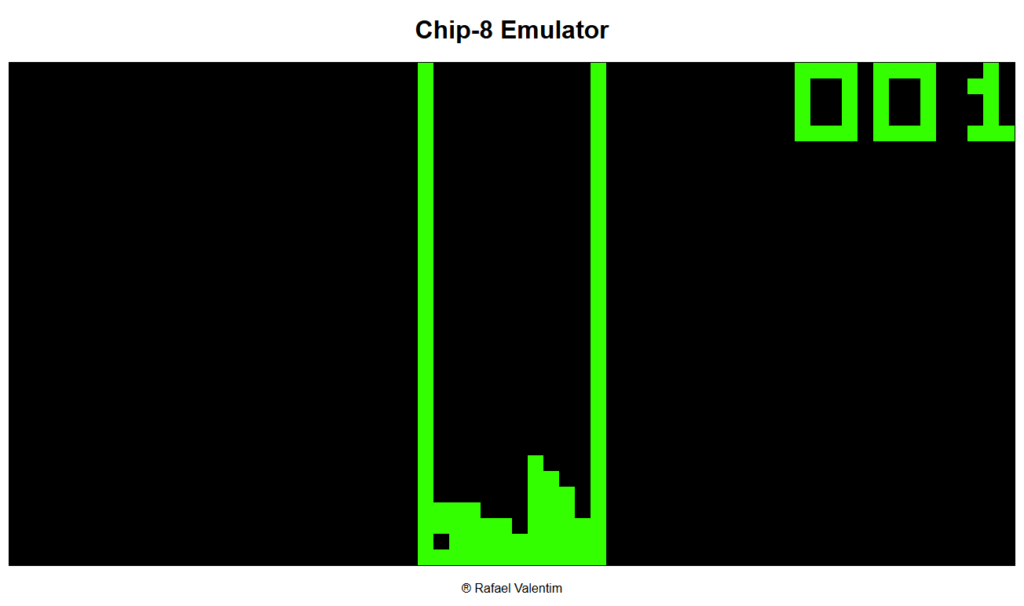
run()Code language: JavaScript (javascript)Enfim, se você chegou até aqui, replicando os arquivos corretamente, ao abrir o arquivo index.html em seu navegador, você deverá visualizar o seguinte jogo em execução:
Para mais detalhes da implementação, visite o repositório completo no Github:
https://github.com/rmvalentim/CHIP-8-Emulator
Lá você conseguirá acessar outras ROMs, como o jogo Pong. Um exercício interessante é tentar mudar o jogo do emulador, substituindo o conteúdo Hexadecimal que é carregado na memória do emulador (função loadRom).
Nos próximos passos desse projeto, pretendo desenvolver novas versões do emulador com linguagens e ferramentas diferentes (a próxima deverá ser Python com a biblioteca PyGame).
Se você se interessou pelo tema, abaixo alguns links relevantes que utilizei na minha pesquisa durante o desenvolvimento do emulador, até a próxima.
https://tobiasvl.github.io/blog/write-a-chip-8-emulator

1 Response
[…] Emuladores, Chip 8, e os Fundamentos da Computação – Parte 2 (Código Fonte) […]